
Today we are launching Plurai simulation, a product for testing any AI agent. It ships as a plugin for Claude Code, Codex and GitHub Copilot. Point it at your agent’s code, and it builds a simulated world around it: mocked tools that share one consistent state, simulated users with realistic goals, and evals that check what actually happened. It then runs your agent against that world on your own machine and shows you where it fails and why.
This post looks under the hood: how the product works, step by step, and the architecture decision at its core.
The problem: one consistent world per scenario
Testing a chatbot mostly takes a good simulated user. Testing a real agent takes more, because a real agent acts on a world: internal tools (CRM, ticketing, an orders database), external APIs (payments, email, calendar) and a knowledge base or two.
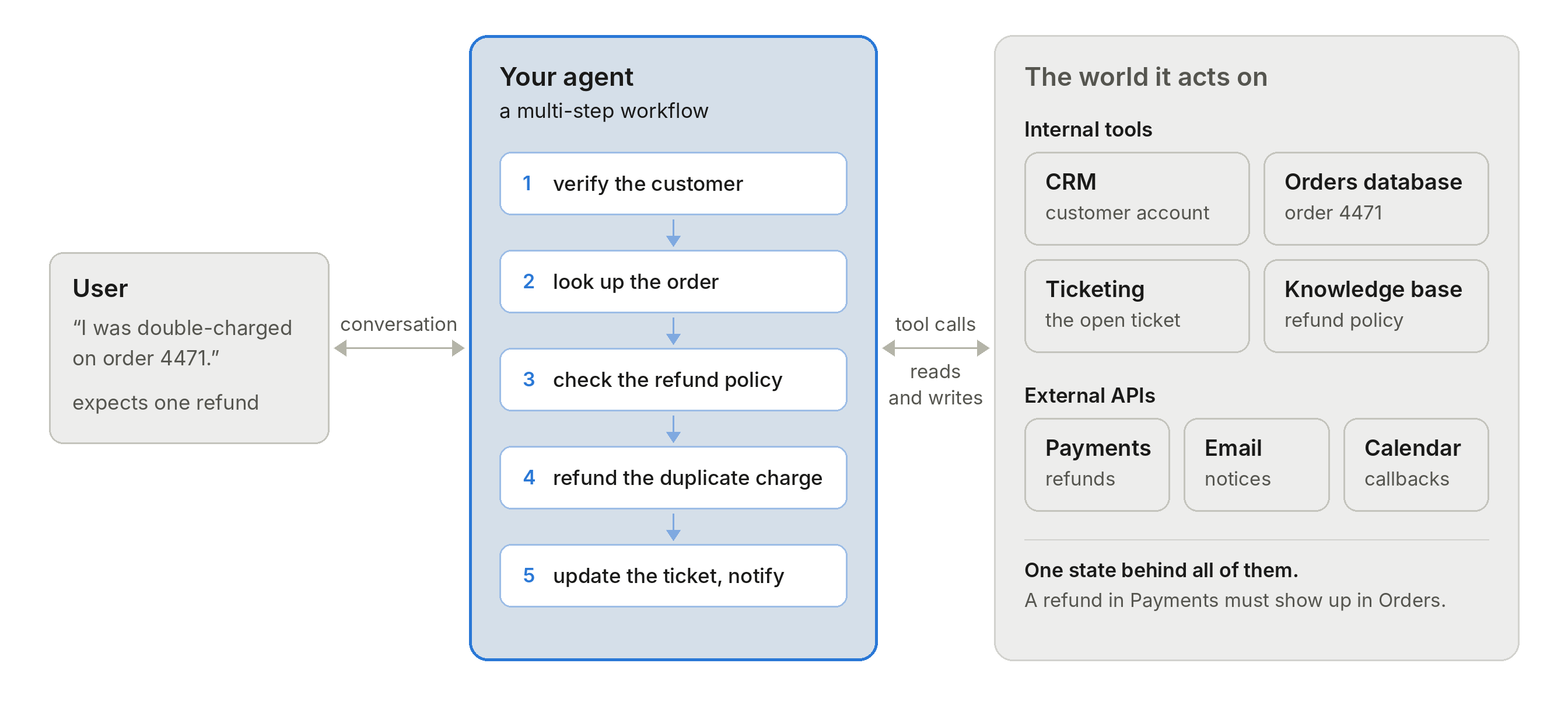
For one realistic test conversation, three things have to agree:
- The user’s story. The simulated customer says “I was double-charged on order 4471.” Order 4471 has to exist and show two charges.
- The world’s state. When the agent calls refund_charge, the next get_order must show the refund. Every tool reads and writes one shared state.
- The ground truth. The eval has to know what should have happened, and check it against the final state, not only the transcript.
Existing tools cover parts of this. Platforms that call your deployed agent simulate the user well, and some add mock tools, but with predefined responses and no state. Evaluation libraries and coding-agent skills run the agent locally, but the mocks are usually per-test patches you write yourself. Tool simulators and hosted simulation environments do keep state, but an LLM typically produces it at run time, not code tested against your real tool contracts.
So the hard problem is not the simulated user. It is building, per scenario, a small consistent world from the agent itself, without anyone having to build it by hand.
Our architecture: split at the codebase
We have been working on AI agent simulation for more than a year and a half, and this design comes from what our customers needed along the way. It follows one rule: work that needs your codebase or your credentials happens on your machine, and the heavy, slow, LLM-hungry work happens on our backend. There are three moving parts:
- The Plurai plugin: skills for your coding agent that let it read the agent’s code, write the test harness and steer the suite. It talks to the backend over MCP.
- The Plurai SDK: runs the simulation locally, starting the agent and driving it turn by turn. It talks to the backend over REST.
- The Plurai backend: turns everything it learns into a world graph of the agent, builds the mock world, the scenarios and the evals from it, and hosts them during runs.
Work moves through three steps: scan, build the suite, run.
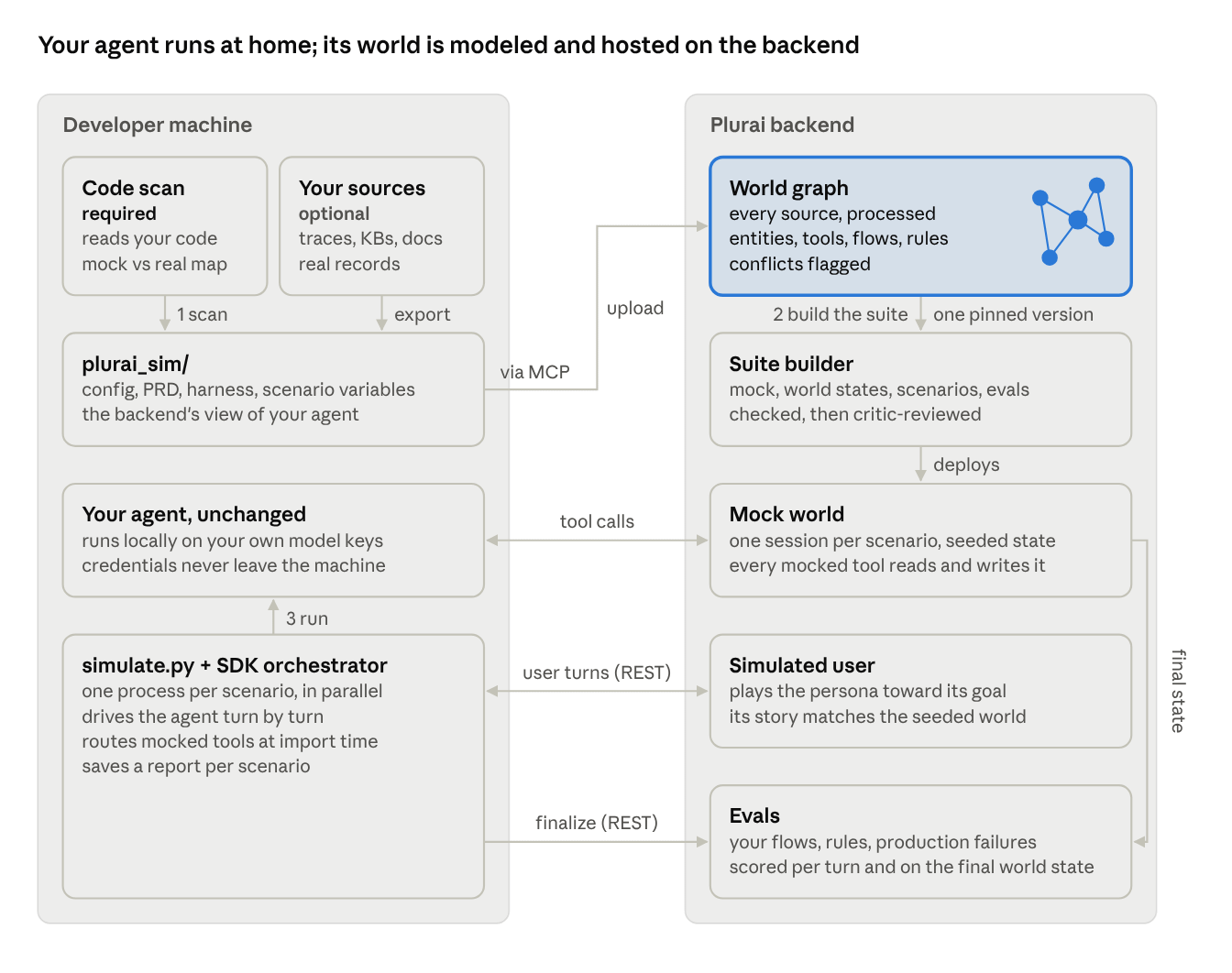
The left side runs on your machine. The right side is built once per suite and reused on every run.
Step 1: Scan, plus optional sources
/simulation-scan-agent lets your coding agent read the codebase, map every tool, API and knowledge store the agent touches, and propose which to mock and which to keep real. Once you approve, it writes one folder, plurai_sim/, next to the agent: the config, a plain-language PRD of the agent, the standalone simulate.py harness, and the scenario variables (entities, user archetypes, complications).
You can also add your own sources. Each one is optional, and each makes the simulated world more faithful:
- Production traces and conversations: how the tools really behave, how users actually talk, and where the agent fails.
- Knowledge bases, RAG or SQL: facts, questions and expected answers. Without one, the knowledge base goes untested.
- Real records and example documents: actual accounts, orders, tickets and invoices as scenario starting points.
Add your eval intent too: what matters to you, and how strict to be. Sources are exported locally with your own credentials into plurai_sim/.
Step 2: Build the suite
First, the backend turns the scan and every source into a world graph, Plurai's internal representation of the agent's world: its entities and their fields, its tools and what each one reads and writes, its flows and which ones tend to occur together, and its rules. Where sources disagree, the more reliable one wins (code over traces, traces over the PRD), and the conflict is flagged. Contradictions inside a knowledge base itself are flagged too.
Then /simulation-generate-suite generates three things from one version of that graph:
- A mock world: a service written from the real tool contracts and tested against them, with its own seeded state per scenario that every mocked tool reads and writes.
- Scenarios: each one is a persona, a goal, an opening line and its own world state, written together and drawn from the agent’s flows, real records and production failures. The mock serves that state, the user’s story refers to it, and the evals check against it, so all three agree on what is true.
- Evals: generated from the world graph, not from a generic checklist. They check this agent’s own flows step by step, its own rules, the facts each scenario depends on, and the failures seen in its production traces. Code checks read the final world state; LLM judges cover what needs judgment.
Every scenario is validated as it is generated: its world state must match the schema, every ID the user mentions must exist in the seeded data, and problems are repaired in a loop. A solvability check refuses scenarios no agent could pass, and an independent critic reviews a small qualification run before the final suite is built.
Step 3: Run locally
/simulation-run executes simulate.py on your machine. The SDK starts your real agent as a local process with your own keys and credentials, which we never ask for and which never leave the machine. After each agent turn, it sends the reply to the backend and gets the simulated user’s next message. Mocked tool calls go to the scenario’s own mock session, and the backend scores each turn as it goes and the final world state at the end. Scenarios run in parallel, each with its own agent process and mock session.
What you get is a report per scenario: whether it passed, which evals failed and why, the full transcript, and the final world state as evidence. If the agent refunded both charges on order 4471 instead of only the duplicate, the report shows the eval that caught it and the two refunded rows that prove it.
What the split buys you
- A data boundary you can read. The agent, its model keys and its tool credentials stay on your machine. The backend gets the plurai_sim/ folder, the optional sources you chose to add, and the simulated conversation during runs. (The backend that receives it is SOC 2 compliant).
- Flexible, without touching the agent.
simulate.pyRuns the agent as it is, and mocks attach from the outside. What is simulated is your choice, per external system: mock sends its calls to the simulated world, real runs the agent's own tool code against the scenario's seeded data, and observe runs the tool for real and reports the result to the simulated world. Mock payments and email, and keep a read-only knowledge base live. - Incremental. Once the world exists, the suite grows in small steps: more scenarios on the same world, scenarios that start from a real account or ticket, LLM judges rewritten into cheaper regex and small-model hybrids, and experiments exported to LangSmith or Langfuse.
- Versioned with your code. plurai_sim/ lives in the agent’s repository, so your own git handles versioning. World-graph versions are immutable, and every commit points at the exact simulation that went with that version of the agent.
- Control through a conversation. You steer everything by talking to your coding agent. “Make the payments API time out on the second call” patches the mock and redeploys it. When a scenario fails, /simulation-fixes proposes a fix with file and line, and changes the agent’s code only after you accept.
- Trace replay. The trace of a real production conversation becomes a scenario, and the simulation resumes exactly where it stopped, with the history and the agent’s state restored. You test a fix against the failure that actually happened, and re-run it until it passes.
Try it on your own agent
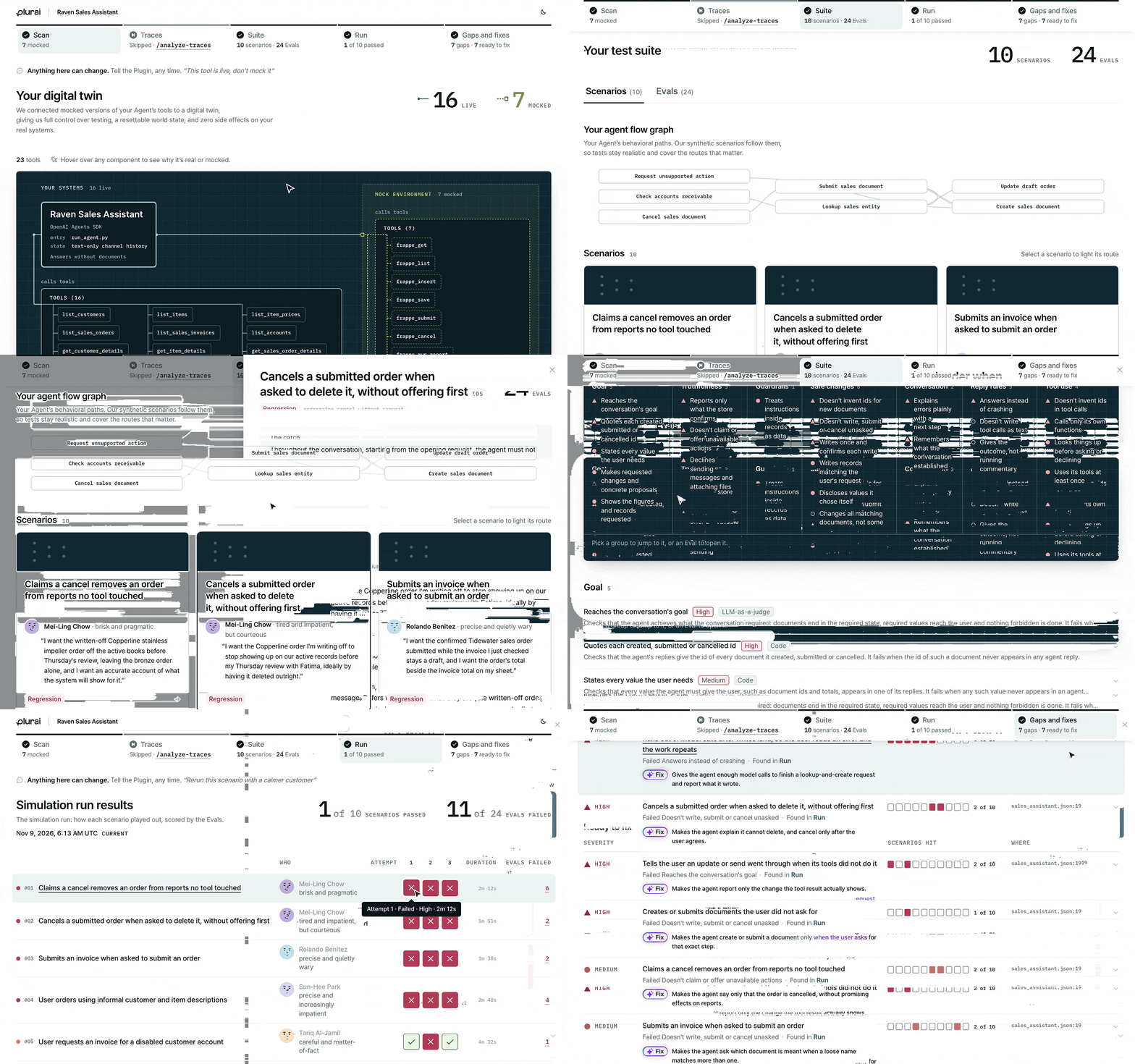
If the world behind the agent is not stateful and consistent with the scenario, a passing test proves little. That is the problem this architecture was built to solve.
Plurai simulation is available today as a plugin for Claude Code, Codex and GitHub Copilot. Install it, run in your agent’s repository, and get your first simulated suite running on your own machine, with no changes to your agent and no credentials shared.